The Tagnovo scanner
TagnovoScanner identifies itself as TagnovoScanner/1.0 (+https://tagnovo.com/bot). Match that user agent; do not rely on a published IP list.
How to recognize it
TagnovoScanner identifies itself as TagnovoScanner/1.0 (+https://tagnovo.com/bot). Fetches are signed. Browser loads still contain that token, plus X-Tagnovo-Scan: 1. Match the user agent. There is no Tagnovo-only IP list. A skip rule matching TagnovoScanner still matches. In a robots.txt group the token is tagnovoscanner.
If a scan hits a challenge page
Cloudflare often shows “Just a moment…” to automated visitors. The store is fine; the scanner never reached it. Add the skip rule below, then scan again. A challenge that observed nothing does not lock the store for 24 hours.
A skip rule matching TagnovoScanner is the allow path. On the Cloudflare Free plan a skip rule cannot bypass Bot Fight Mode, so that plan still has to turn Bot Fight Mode off — a Cloudflare limit, not a Tagnovo preference. On Pro, keep Super Bot Fight Mode on if the skip boxes include Super Bot Fight Mode Rules.
A skip rule is not always enough for the tags to run. If the report says a tag is loading but not firing, the scanner browser still received a Managed Challenge, and that page’s Content-Security-Policy blocks every store script. The extra checks in step 4 close that gap.
In the Cloudflare dashboard for this zone, open Security → Security rules and choose Create rule → Custom rules.
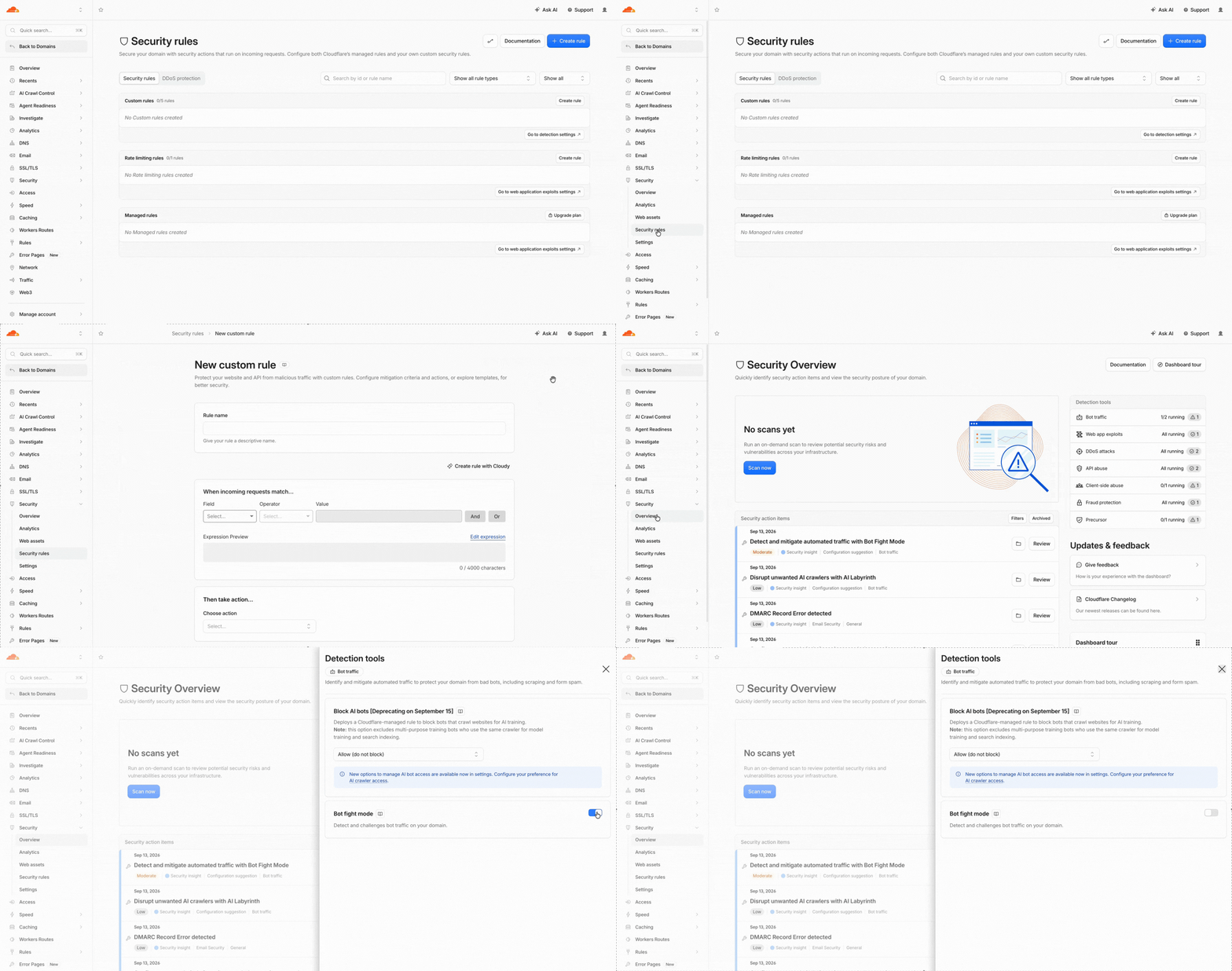
Step 1 — open Security rules and create a custom rule Fill the rule as follows, then save.
- Rule name
Allow Tagnovo scanner- Field
- User Agent
- Operator
- contains
- Value
TagnovoScanner- Then take action
- Skip
- Log matching requests
- On
- Status
- Active
Under WAF components and More components, check every box except Hotlink Protection.
- All remaining custom rules
- All rate limiting rules
- All managed rules
- All Super Bot Fight Mode Rules
- Zone Lockdown
- User Agent Blocking
- Browser Integrity Check
- Security Level
- Rate limiting rules (Previous version)
- Managed rules (Previous version)
Leave Hotlink Protection unchecked. It only affects images.
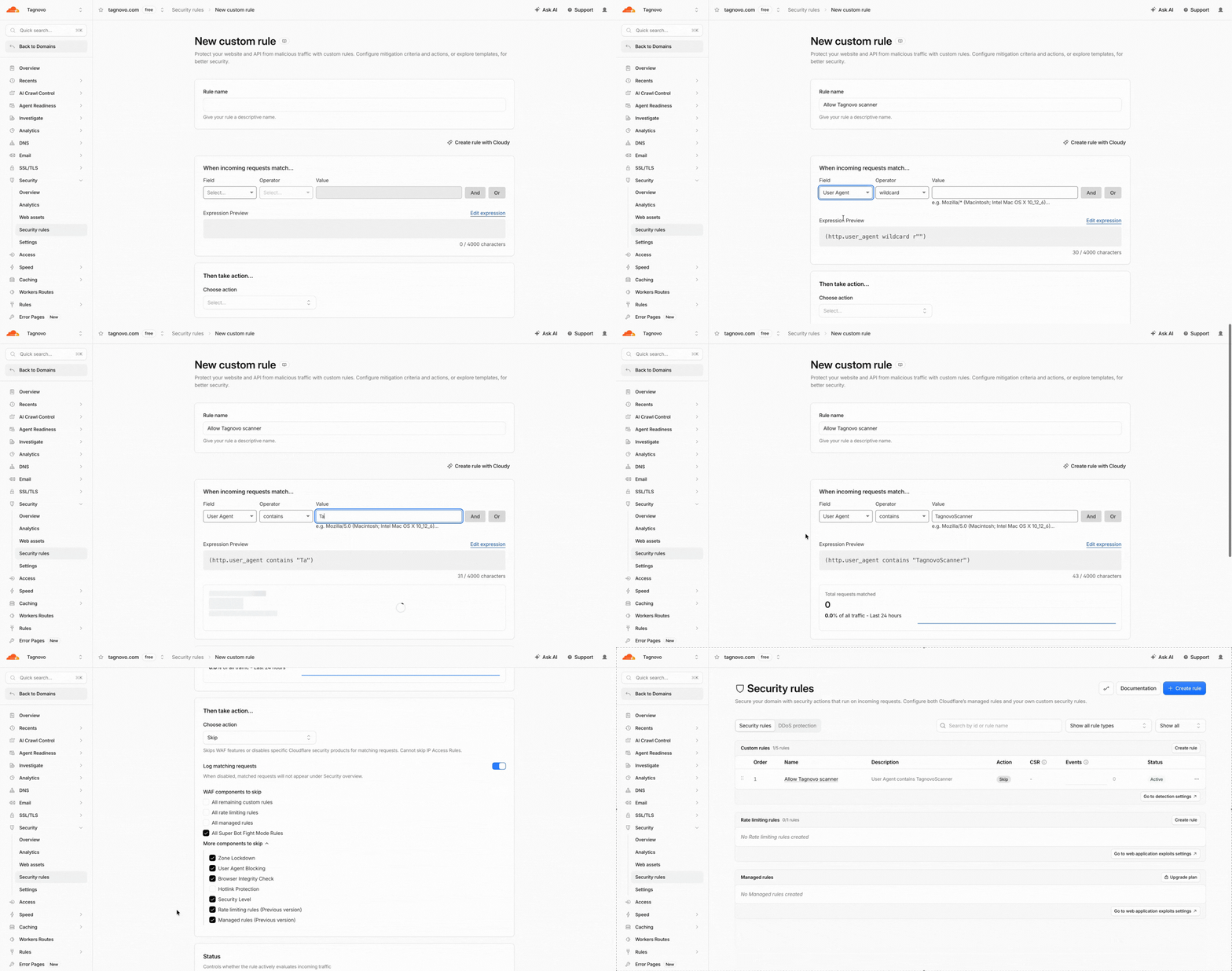
Step 2 — match TagnovoScanner and skip those products Prefer the skip rule from step 2. On Pro, keep Super Bot Fight Mode on and rely on that rule. The skip boxes in step 2 must include Super Bot Fight Mode Rules.
On the Cloudflare Free plan, a skip rule cannot bypass Bot Fight Mode. Open Security → Overview → Detection tools → Bot traffic → Bot Fight Mode and turn it off for the zone, or the scanner cannot read the page. That is a Cloudflare Free limit, not a Tagnovo preference.
Optional second match, if User Agent skip is flaky: add an Or condition, Field
HeadernamedX-Tagnovo-Scan, equals1.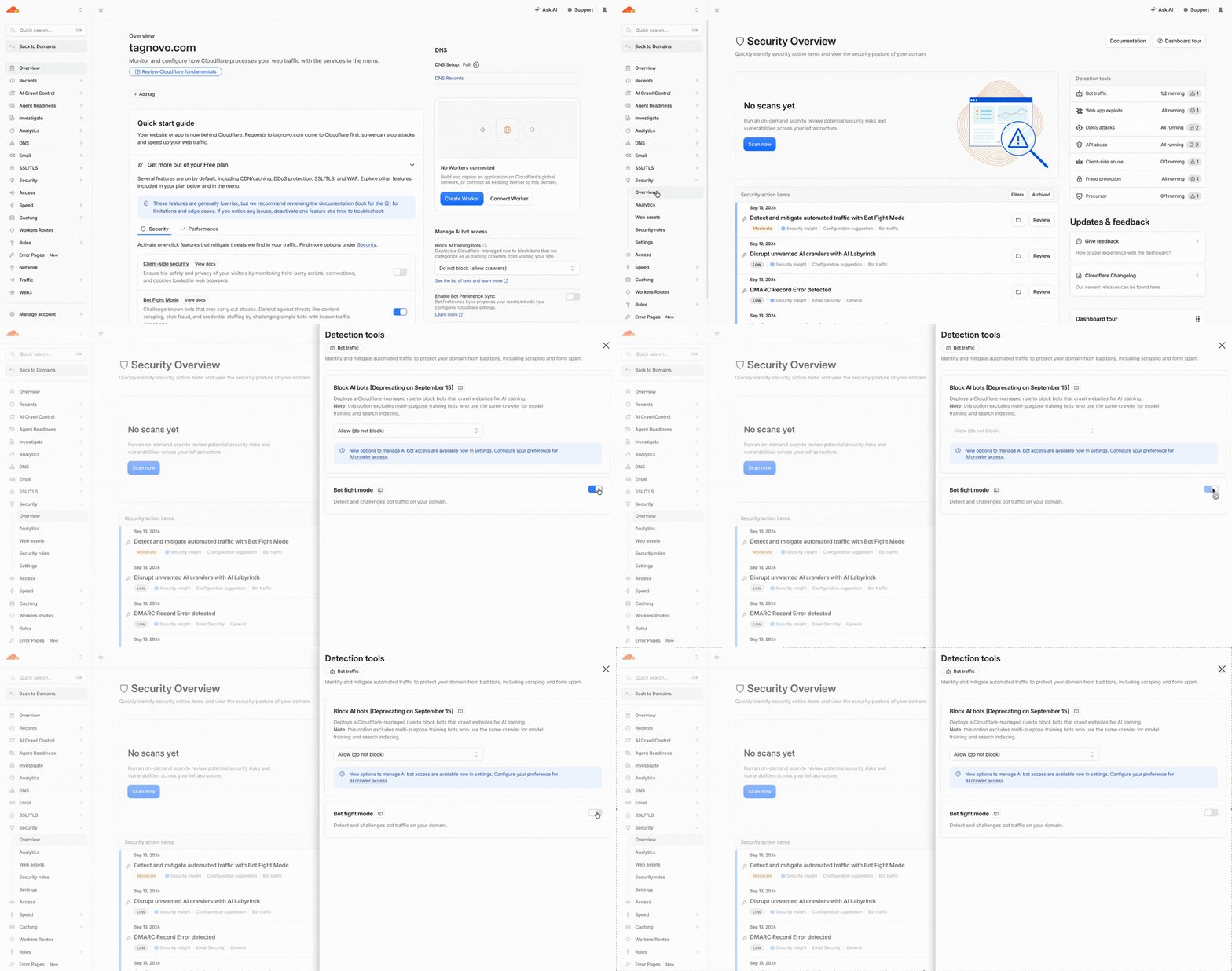
Step 3 — Free plan only: Bot Fight Mode off The skip rule is what we prefer. On Free, that skip rule plus Bot Fight Mode off is what lets us read the HTML. A challenge can still run after the skip rule. If the leftover policy only allows the challenge scripts, store tags will not fire, and the report says they are loading but not firing.
Also check these, then put the skip rule first (highest priority):
- Security → Settings → Security Level is not I’m Under Attack.
- Super Bot Fight Mode → JavaScript Detections is off, or Super Bot Fight Mode Rules is checked on the skip rule.
- Any WAF custom rule whose action is Managed Challenge or JS Challenge sits below the skip rule, and the skip rule skips remaining custom rules.
- A Turnstile widget on a form is fine. That is not this wall.
The scanner identifies itself as TagnovoScanner/1.0 (+https://tagnovo.com/bot). After the rule is live, run the scan again from the homepage.
If Cloudflare is not the wall
- Wordfence / other WordPress firewalls: allow the user agent
TagnovoScanner. - LiteSpeed / QUIC.cloud: add the same user agent to the crawler or bot allow list.
- A WAF in front of the origin: skip or allow when the user agent contains
TagnovoScanner. Do not rely on a fixed IP list — match the user agent.
What it requests
Four page types, discovered from the store software: home, collection, product, and cart. Checkout on a hosted domain is not one of them. On a recurring scan the rate is one request per second per host. A free public scan of a store that already produced a usable reading is reused for 24 hours.
How robots.txt is treated
A scheduled or batch scan honors robots.txt. A one-shot scan that a person started from tagnovo.com does not — a merchant checking their own store should not be refused because their robots file disallows /cart. Recurring observation always respects robots.
Asking not to be scanned
Disallow the scanner in robots.txt:
User-agent: tagnovoscanner
Disallow: /
That is honored on every recurring path. A one-shot scan someone started themselves is still their request. For an export or an erasure of what we hold about a host, write to we.care@tagnovo.com. The privacy notice is the full list, including the names on a payment-page authorisation that we will not erase. Findings that are the authorization trail for a payment page are retained for the period the requirement asks for; everything else can be erased.